
Ask KB is an AI assistant that answers questions based on your team’s documentation. Answers include citations — links to the specific KB articles used.
Opening the Assistant
- Click the Ask AI button in the KB toolbar
- Or type a question in search and select «Ask AI» instead of regular search
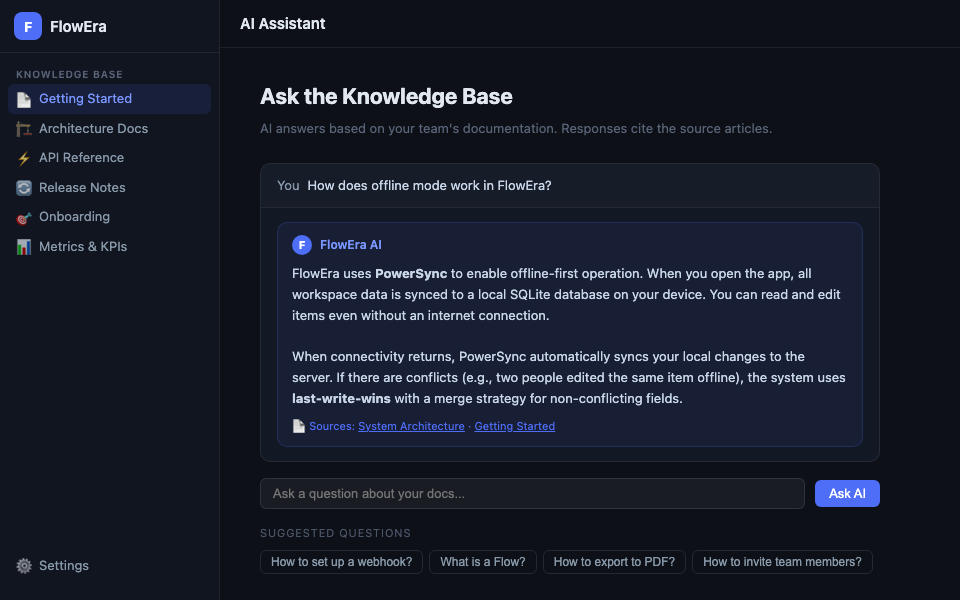
Ask a Question
Type a question in natural language. Examples:
- «How does offline mode work?»
- «What error format does our API use?»
- «How do I invite a new team member?»
- «What is a Flow and how do I configure it?»
Answer with Sources
The AI provides an answer and shows a list of articles the information came from. Click a source link to open the corresponding article.
Answer: FlowEra uses PowerSync for offline-first operation...

📄 Sources:
  · System Architecture
  · Getting Started
What the AI Can Do
- Summarize information from multiple articles
- Answer technical questions about your documentation
- Give step-by-step instructions based on guides
- Compare approaches described in different articles
Limitations
- The AI answers only from your documentation — no external knowledge used
- If information is absent from KB, the AI will clearly say so
- Answers based on outdated articles may be inaccurate — keep your documentation up to date
Suggested Questions
Below the input field — cards with suggested questions based on your team’s most common queries. Click a card to ask the question instantly.
Current Article Context
When the AI assistant is opened within an article (rather than from the KB homepage), it considers that article’s context. Asking «what’s unclear here?» will analyze the current page.
Ask KB only uses data from your workspace. Your documentation is not shared with third parties and is not used for model training.