
FlowEra supports math formulas in the knowledge base editor. Formulas are written in LaTeX syntax and rendered directly in articles — from simple equations to complex matrices and integrals.
Why Formulas in a Knowledge Base
Describing math in plain text is hard to read: “the square root of the sum of squares” is far harder to parse than a formula. Built-in formula rendering solves this: formulas render directly in the article, look professional, and don’t require manually inserting images.
Common use cases:
- Documenting algorithms and metrics
- Describing statistical indicators (burndown, velocity, percentiles)
- Technical specifications with formulas
- Educational and training materials
How to Insert a Formula
Inline formula
Wrap a formula in single dollar signs $...$ to render it inline:
Team velocity: $v = \frac{\sum points}{days}$The formula appears in the text flow without breaking it.
Block formula
Use double dollar signs $$...$$ for standalone formulas:
$$
E = mc^2
$$
Block formulas are centered and visually separated from the text — ideal for key equations.
Inserting via the command menu
Open an article, type / in the editor, then select Math or Formula. The editor creates a block with a formula input field and live preview.
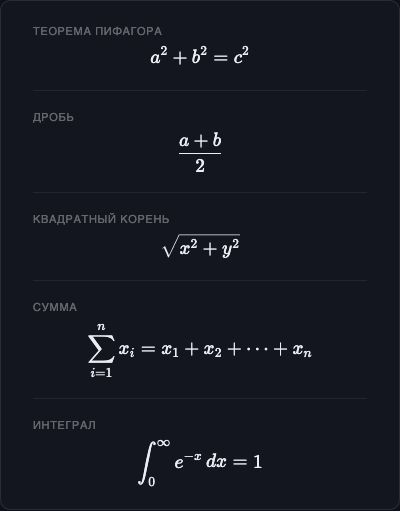
First Examples
Basic arithmetic
$$a^2 + b^2 = c^2$$Fraction
$$\frac{a + b}{2}$$Square root
$$\sqrt{x^2 + y^2}$$Sum
$$\sum_{i=1}^{n} x_i = x_1 + x_2 + \cdots + x_n$$Integral
$$\int_0^\infty e^{-x}\, dx = 1$$Syntax Conventions
Formulas use LaTeX syntax (rendered via KaTeX):
| Pattern | Meaning |
|---|---|
\command | Special symbol or operator |
{group} | Group arguments |
^{power} | Superscript |
_{index} | Subscript |
\frac{a}{b} | Fraction |
\sqrt{x} | Square root |
If the argument is a single character, curly braces can be omitted: x^2 = x^{2}.
Next Steps
- Basic Syntax — fractions, powers, Greek letters, comparison operators
- Advanced Formulas — matrices, sums, integrals, systems of equations