
Tables in the knowledge base support cell formatting, adding and removing rows and columns, and header styling.
Creating a Table
- Slash menu:
/table→ Enter - A new table is created with 3 columns and 3 rows
Managing Rows and Columns
Hover over a row or column — a context menu appears (three dots ⋯):
For a row:
- Insert row above / below
- Delete row
- Duplicate row
For a column:
- Insert column left / right
- Delete column
- Resize (drag the right border of the column header)
Cell Formatting
Standard text formatting is available inside cells: bold, italic, code, links. Multi-line text uses Shift+Enter.
Table Header
The first row is the header by default — styled differently and excluded from sorting. To remove the header style, right-click the row → «Remove header».
Column Alignment
Click a column header → choose alignment:
- Left (default)
- Center
- Right
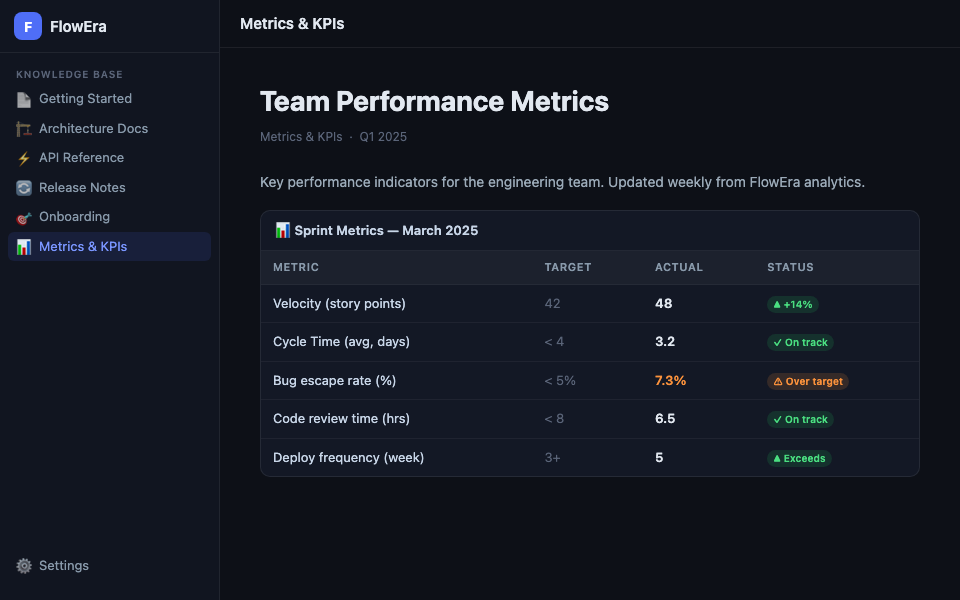
Example: Metrics Table
| Metric | Target | Actual | Status |
|---|---|---|---|
| Velocity | 42 SP | 48 SP | ✅ +14% |
| Cycle Time | < 4 days | 3.2 days | ✅ OK |
| Bug rate | < 5% | 7.3% | ⚠️ Over target |
| Deploys/week | 3+ | 5 | ✅ Excellent |
Example: API Table
| Endpoint | Method | Auth | Description |
|---|---|---|---|
/api/items | GET | ✓ | List tasks |
/api/items | POST | ✓ | Create task |
/api/items/:id | PATCH | ✓ | Update task |
/api/auth/login | POST | — | Login |
Tables with many columns scroll horizontally on mobile devices.