
Multiple team members can edit the same article at the same time. All changes sync in real time — no locks, no save conflicts.
Presence Indicator
The topbar of an open article shows avatars of everyone currently editing it. Hover over an avatar to see the person’s name.
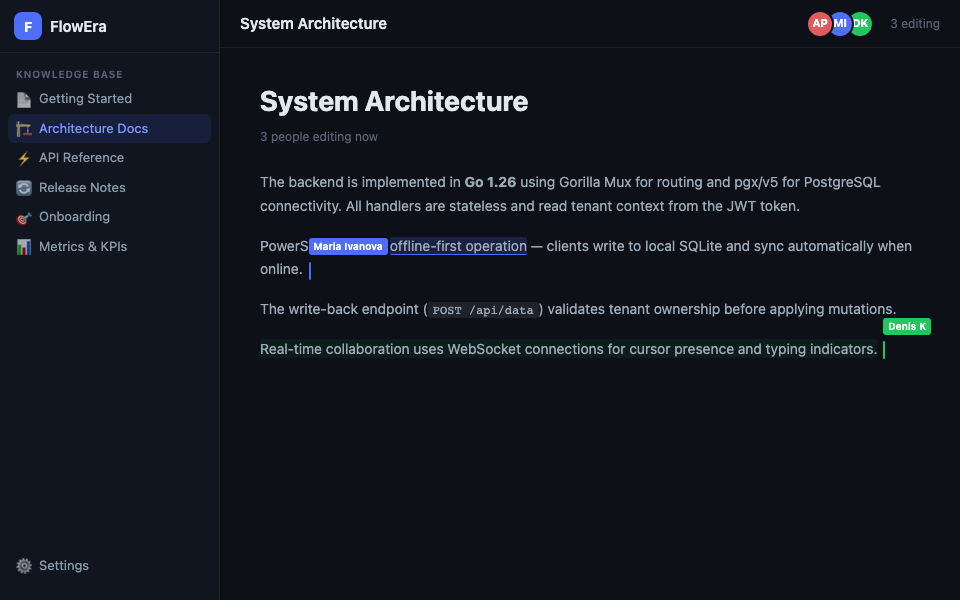
Live Cursors
Other editors’ cursors are visible in the text in real time:
- Each participant gets a unique color
- The name is shown above the cursor
- Selected text is highlighted in that participant’s color
How It Works
FlowEra uses operational transformation (OT):
- Every change is an atomic operation (character insert, delete, format)
- Operations are applied instantly locally
- Synced with the server via WebSocket
- Conflicting operations are automatically transformed — both changes are preserved
Typing Indicator
When another participant is actively typing, their name appears in the status bar at the bottom. This helps avoid editing the same paragraph simultaneously.
Offline Editing
If the connection drops, the editor keeps working:
- Changes are buffered locally
- On reconnect, they sync automatically
- Conflicts with other participants’ offline changes resolve automatically
Collaboration Limits
- Up to 50 participants can edit an article simultaneously
- If an article is locked by an admin (read-only mode), editing is disabled
- Guests (external users with a public link) work in read-only mode