
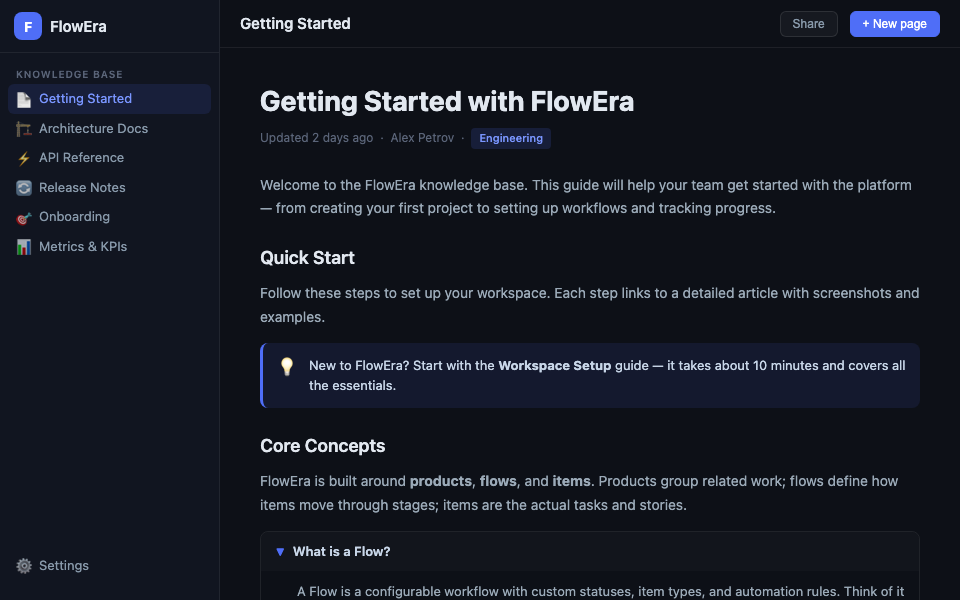
The FlowEra knowledge base editor is a block-based WYSIWYG editor. Every article is made of blocks: paragraphs, headings, code, tables, images, and dozens more. All formatting is visible immediately — no markup required.
Editor Layout
The editor opens when you click any article in the page tree. The interface has three areas:
- Left panel — page tree, KB search
- Center area — the editor with article content
- Right panel — comments, relations, history (opens on demand)
Creating an Article
Click + New page in the topbar or the + button in the page tree. The article is created immediately with the cursor in the title — start typing the name.
To add content:
- Type text in a paragraph
- Press
/on an empty line to open the command menu - Select the block type you need
Blocks
Every element in an article is a block. Blocks can be:
- Dragged — grab the
⠿handle on the left - Duplicated — press
⌘Don an active block - Deleted — press
⌘⌫or select Delete from the context menu
Supported block types:
- Headings H1–H3
- Paragraph, blockquote
- Bulleted and numbered lists
- Code blocks with syntax highlighting
- Toggle blocks
- Callout blocks
- Tables, images
- Math formulas (LaTeX)
- Mermaid diagrams
- Embedded widgets
Auto-save
The editor saves changes automatically. The article header shows «Saved» or the timestamp of the last save. No save button needed.
Next Steps
- Command Menu (Slash Menu) — full list of available commands
- Keyboard Shortcuts — speed up your workflow
- Text Formatting — all styling options