
Mind maps in Mermaid are hierarchical diagrams with a central theme and branches. They are great for brainstorming, structuring ideas, and documenting architectural decisions.
Basic Syntax
A mind map is built with indentation — each indent level adds a hierarchy level:
mindmap
  root((FlowEra))
    Tasks
      Kanban
      Table
      Gantt
    Knowledge Base
      Editor
      Mermaid
      Collaboration
    Analytics
      Burndown
      CFD
      Lead Time
    Settings
      Workflows
      Status Models
      Fields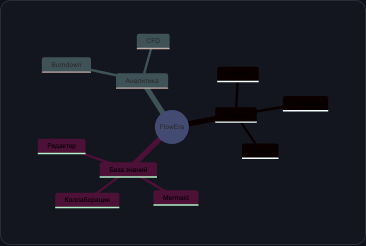
Node Shapes
| Syntax | Shape |
|---|---|
root((text)) | Circle |
[text] | Rectangle |
(text) | Rounded |
)text( | Outward rounded |
{{text}} | Hexagon |
))text(( | Cloud |
Example: Feature Decomposition
mindmap
  root((Auth\nModule))
    Registration
      Email + password
      OAuth
        GitHub
        Google
      Email verification
    Login
      Login form
      Remember me
      2FA
        TOTP
        SMS
    Tokens
      JWT
        Access token
        Refresh token
      Storage
        httpOnly cookies
    Security
      Rate limiting
      Brute force protection
      Audit log
    Password Recovery
      Email link
      Expiry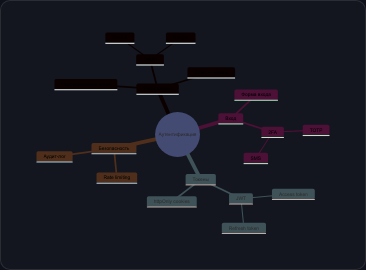
Tips
- For brainstorming: start with the central theme and add branches as ideas emerge
- For decomposition: break functionality into subtasks until tasks become estimable
- For architecture: show system components and their relationships
- Depth limit: more than 4-5 levels of nesting makes the diagram unreadable — split into multiple mind maps