
Embed live project data from FlowEra directly into KB articles. The widget shows the current state of a board, sprint, or Gantt chart — without page refreshes.
Adding a Widget
- Slash menu:
/embed→ choose widget type → select project and workspace
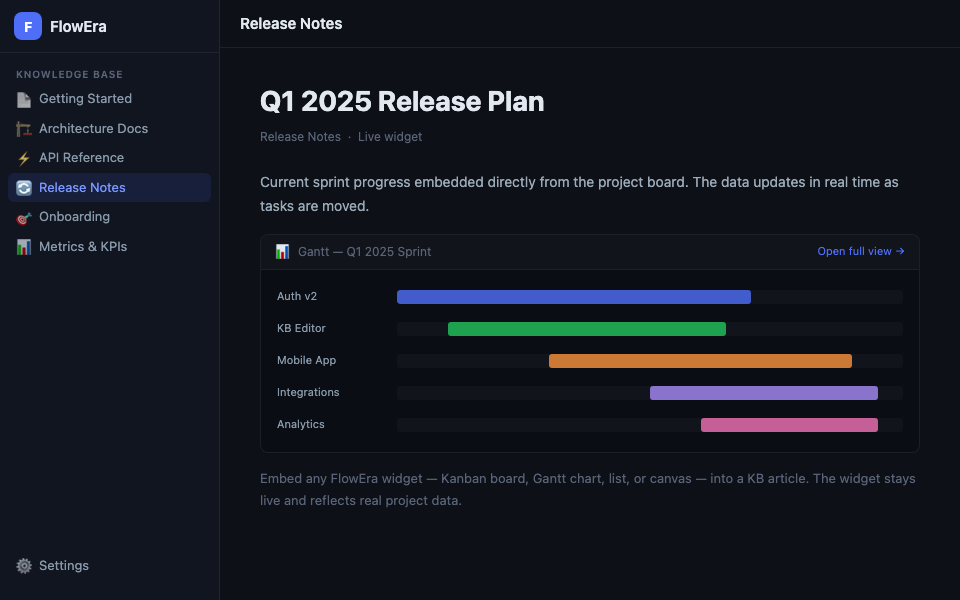
Available Widget Types
| Type | Description |
|---|---|
| Gantt | Gantt chart with tasks and dates |
| Kanban | Board with status columns |
| List | Task list with filters |
| Canvas | Diagrams and schematics |
Widget Settings
After inserting, click the ⚙️ gear in the widget header:
- Project / Flow — choose the data source
- Filters — limit displayed tasks (by sprint, assignee, status)
- Height — set the widget size in the article
- Read-only — disable editing directly from KB
Interactivity
Embedded widgets are interactive: you can click tasks to view details, and open the full view with the «Open full view →» button. However, dragging tasks and changing statuses are disabled — to prevent accidental edits while reading.
Use Cases
Sprint status in release notes
Embed a Gantt widget of the current sprint in release notes — readers see live progress without navigating to the project.
Roadmap in a strategy document
Embed a Kanban board with the product roadmap in a strategy article. Project updates automatically reflect in the document.
Dashboard in a weekly report
Include a list widget with open blockers in the team’s weekly report.
Widgets are only visible to members with access to the corresponding project. Others see a «No access to this workspace» placeholder.